
Understanding the difference between posts and pages
Updated about 1 month ago
Browse All
Posts and pages both give you a title, a body, and a place to write. The difference is what they're for: posts are entries that pile up over time, and pages are the steady, standing parts of your site.
Where they live
Both sit in the left-hand menu of your dashboard, one above the other: Posts for your blog entries, Pages for everything that stays put. Each one has its own list of everything you've written so far, and at a glance the two lists look almost identical — the same Title, the same Author, the same Date. The giveaway is in the middle: your posts list carries Categories and Tags columns, and your pages list doesn't.
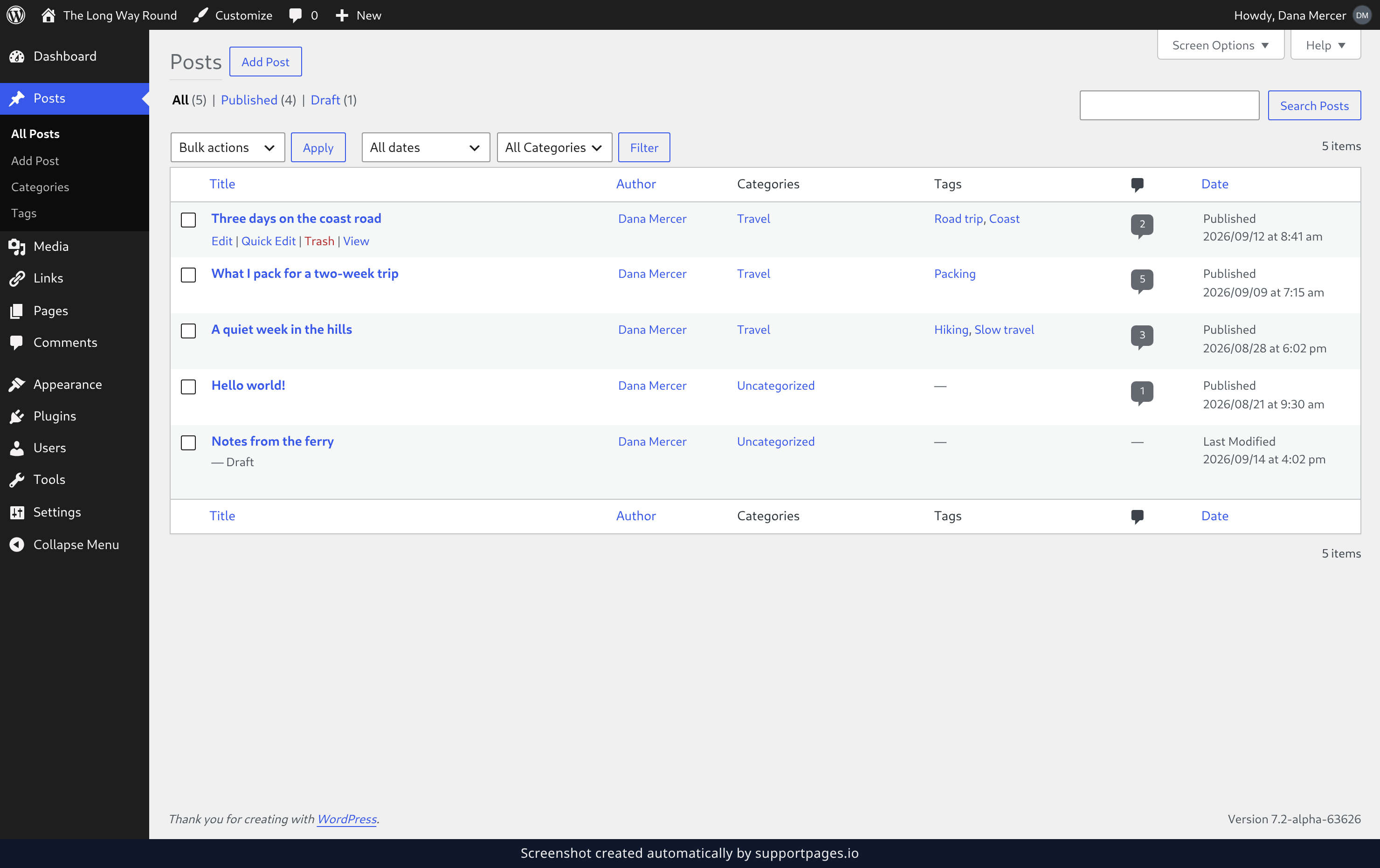
Posts are the timely ones
A post is a dated entry. The moment you publish one it appears at the top of your blog, and it drifts further down as you add more. That's the whole idea — readers move through posts in order, newest first. Because posts arrive one after another, they're also the only one of the two that can be sorted into Categories and Tags, which is what keeps a blog readable once you have a hundred entries. Posts show up in your site's feed too, with their date attached. If the content belongs to a moment — a launch, a trip, a weekly round-up — it's a post.
Pages are the standing ones
A page is the opposite kind of thing: content that stays where you put it. Think your About page, your contact details, your opening hours. A page has no date on it, it never scrolls off the bottom of anything, and it stays out of your blog stream entirely. Pages aren't sorted into Categories or Tags either. Instead they can be nested, so one page can sit underneath another — Contact under About, for instance — which is how a plain set of pages turns into a small structure.
The two side by side
- Posts — dated entries that stack up newest-first in your blog stream.
- Pages — undated, standing content that stays where you put it.
- Posts are sorted with Categories and Tags; pages are sorted by nesting one underneath another.
- Posts appear in your site's feed and in search results with a date; pages don't.
- Both give you a title, a body, and a featured image.
Choosing between them
Ask yourself one question: is this tied to a moment in time? If the answer is yes, write a post. If you'd want the same words on the page a year from now, write a page. When you're genuinely unsure, start with a post — it's the one that can be filed, searched, and archived later, and if it turns out to be permanent content you can copy it into a page. Nothing is locked in either way.
Tips
- If you'd link to it from your main menu and almost never change it, it's a page.
- If it has a date and you'd want readers to find it in order, it's a post.
- You can switch the writing you've done between the two at any time — the editing screen is the same.
Summary
Posts are the dated entries that stack up in your blog, sorted with Categories and Tags. Pages are the standing pieces that stay where you put them and can nest underneath one another. Pick by asking whether the content belongs to a moment — and if it doesn't, make it a page.
Was this article helpful?
Built with supportpages.io — an AI documentation generator.
Have a question?
Search our articles, or ask and get an answer straight away.